

Tutorial: Building your first website using a free website template (part 1)
This is the first in a series of blog posts that will explain how to use a free website template to build and publish a complete website. The series will explain what a website template is, how you download a template, how you use code editing software to make changes in the template and add your own content, how you create multiple pages and add a navigation menu, how you make changes to the design and finally how you publish your website on an own domain so that the world can see it.
New posts will be published with a few days in between, allowing the series to be dynamic and include feedback from readers and answers to questions that may come up on the way. To follow this tutorial as new posts are published, you can subscribe to the feed or follow Andreas on Twitter. Feedback, questions and requests can be posted as comments to each entry.

Introduction
So, you have decided to build a website? Great! You are in for a lot of fun, a journey that will be full of surprises and useful experiences. But you will also come to a lot of intersections where you will need to choose directions, often without knowing what comes ahead. In this series of blog posts I will share some of the experiences I have learned during my years as a professional web designer. Not to provide the perfect guide to building websites as it is virtually impossible to create a tutorial that is suitable for everyone, but rather to explain one of the many paths you can follow and hopefully provide some inspiration on the way. A quite good way I’d say, but definitely the only one.
But let’s start from the beginning…
The first decision to make: The starting point
First of all, there are plenty of ways to build websites. It can be done using a variety of online services (free or commercial), or through different kinds of software (code editors or visual editors), or by hiring a web designer (professional or non-professional) to do it for you, or by using content management systems with different kinds of design themes – or by using website templates. Websites can be hosted on many different hosting services or on an own server, and accessed through a generic service URL or through an own domain name. For a person who wants to build their first website, the many options can be a bit overwhelming. And to make it even more confusing, each option has a wide range of quality levels, both regarding the user experience and the resulting website itself. I will write more about quality and why it matters later.
With so many possible starting points, which one is the best? Well, there is usually no good answer to that question. It all depends on the person who will run the future site, and what purpose the site will fill. If you want to run a blog, then a good way to start could be to use one of the many blog networks or a blog script. If you want to run an online store, then a e-commerce service or a content management solution built specifically for online stores may be a better starting point.
But if you want a regular website such as a presentation of yourself or your company and you want complete control of both the design and the content, then it can be a good idea to start with a website template. Beside giving you quick results – you can have your first page online within only a few minutes – you will also be able to learn about the code that websites are made of: HTML (also called the markup, the code that makes up the content and the structure of the site) and CSS (the stylesheet, the code that decides how the content is presented). And you can learn about it in small steps. A website template allows you to start with the one thing that is most important, the content of the website. Once you have the content in place, you can dive deeper into the code as you learn more and start playing around with design elements and visual styles.
The focus of this tutorial: website templates
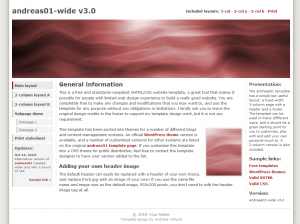 The main content of andreasviklund.com are website templates, pre-designed homepages that contain sample content that shows what a website can look like. The templates are free to download and free to use, and they can be modified in any way you may want to. Building a website from one of the templates on this site doesn’t cost you anything, and the templates are built in a way that makes them easy to edit and easy to learn from. Some templates are more advanced than others, allowing you to choose from multiple layouts and color schemes. But in this series I will use one of the less advanced templates to give you a simple start.
The free website templates on andreasviklund.com are built with a philosophy that ensures that the templates keep a high quality and that they are fully functional in all web browsers. This is important since you want your website to work for everyone who visit it no matter how it is accessed. A website that is accessible for everyone and that is built using well-written code that follows modern web standards will also be easier to find using search engines, which is one of the most common ways of finding websites on specific topics and also an important factor if you build a business website and want your company to be found by potential customers. In future posts, I will explain how you make sure to follow the established standards and how you can check for (and fix) errors in any code you add. But first things first…
Feel free to browse through the free templates gallery to see the different designs that are available, and write a comment to this post if you want to suggest a template that I should use as the example in the forthcoming posts.
OK, let’s move on!
Coming up in the next post: Choosing a template, downloading it and finding an editor for your operating system.

This article was written by Andreas Viklund
Web designer, writer and the creative engine behind this website. Author of most of the free website templates, along with some of the WordPress themes.